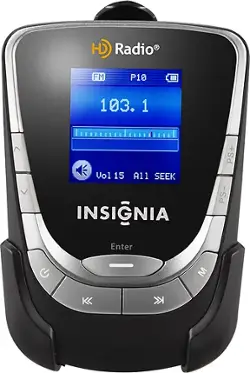
- General
- Product Name: HD Radio Portable Player
- Model Number: NS-HD01
- Warranty
- Manufacturer's Warranty - Parts: 90 days limited
- Manufacturer's Warranty - Labor: 90 days limited
- Other
- Bass Boost: false (Circuitry that boosts the bass response of the amplifier, improving audio reproduction enhancing the sound of low frequencies. Fixed boost means the level of bass response is preset, whereas variable boost allows the user to make adjustments.)
- CD Player: false
- Number Of AM Presets: 10
- Number Of FM Presets: 10
- Display Type: LCD
- Batteries Included: true (Indicates whether the product comes with the required batteries for its operation.)
- Headphone Jack: true (The device features an interface that allows for the connection of headphones.)
- Auto Clock: false
- MP3 Player Compatible: false
- Battery Backup: true (Provides power if the main power source is unavailable.)
- Alarm Clock: No
- Number Of HD Radio Presets: 10
- Battery Size: Other (The battery size required for operation.)
- Number of Batteries Required: 1
- Display Size: 1.5 inches
- UPC: 600603147234
When you're on the go, listen to your favorite HD and FM radio stations using this portable player that features a belt clip for easy portability.
- HD radio with 10-station presets: So you can find your favorite stations at the touch of a button. Also receives standard FM stations (HD radio delivers CD-quality sound from compatible stations in areas where HD radio is available).
- 1.5" LCD color screen: Displays radio station, artist name and song name.
- Belt Clip: For easy portability.
- 3.5mm output: Can be used with a car stereo (cable required, not included).
- Built-in rechargeable lithium-ion battery: Provides up to 10 hours of playing time. USB cable included for charging.
A: At this point, it may not be possible to determine the root cause of your stereo headphone audio output problems from the Insignia NS-HD01 Portable HD Player |SKU:9375071. I suggest that you perform some troubleshooting steps in order to narrow down the possible direct cause(s) of this problem. 1. Make sure the unit is fully charged by plugging in the supplied USB cable into the corresponding port on the HD radio and attach the other end of the cable to an available USB port on your computer. 2. Check the Bose headphones that you are using. Are the headphones damaged in any way? Check the headphone connecting cord for tears or exposed wires. Is the 3.5mm headphone plug connector damaged or dirty? If so, you won’t be able to hear sound any more. 3. Try plugging in the supplied headphones that came in the product packaging. If the supplied stereo headphones work, your Bose headphones may be at fault. 4. Try plugging your Bose headphones into another portable audio product, component stereo system, compact stereo shelf system, computer, or smartphone to see if your third party aftermarket headphones are working properly. 5. Has the Insignia HD portable radio been subjected to product abuse such as a significant fall to the ground or floor, prolonged or excessive exposure to dirt, water, sand, dust, or any other environmental contaminants? Product abuse will result in product dysfunction on a consistent basis. Have you ever opened the unit’s case prior to this incident and attempted to service the product? 6. Does the same problem occur when you plug in a pair of powered speakers or car stereo speaker system into the Insignia HD radio’s headphone jack? If so, the HD radio is malfunctioning. 7. The headphones must be connected to the radio securely to ensure proper operation. Loose connections will cause a malfunction. 8. Make sure the mute function is turned off. 9. Check the volume level again to make sure there is adequate amplification to power your headphones. There are 15 levels of volume adjustment available to you. Please note that the Insignia NS-HD01 portable HD radio does not require any special headphones to operate. This unit is compatible with just about any pair of stereo headphones with a 3.5mm mini-plug connector that Best Buy sells. If none of the above troubleshooting steps assists you in this matter, then it appears your Insignia portable HD radio is malfunctioning. Please see the manufacturer’s warranty statement, purchased product extended warranty statements, Best Buy exchange/return policies for product repair and/or replacement option remedies, if applicable and available to your particular situation. Good Luck.
Q: my computer does not recognize device to charge
A: The Insignia NS-HD01 HD Radio Portable Player |SKU:9375071 can be charged with any available USB port on a computer using the supplied USB cable or from a universal USB charger. If your computer’s USB port is malfunctioning, then you can purchase a universal USB charger to recharge the internal battery in the Insignia portable radio. With that in mind, Best Buy offers a Dynex DX-UAC22 Dual USB Wall Charger |SKU:2525266 for all of your portable audio charging needs. Please note that Best Buy offers a large selection of universal USB chargers for this application that you can consider for your mobile power needs as well. Good Luck.
A: A preliminary analysis suggests that the root cause of your problem rests within your computer. Your prior Best Buy community inquiries state that the USB charging problem occurred only after you replaced your hard drive. The fact that your computer recognizes other USB devices that are not related to high definition portable audio equipment is not indicative in itself that the USB port on the Insignia NS-HD01 HD Radio |SKU:9375071 is defective. In other words, the Insignia HD radio product was in normal working order until you made hardware changes to your computer. It is my suggestion that you should perform some additional troubleshooting steps to obtain a more in depth understanding of the USB charging issue. 1. Try all available USB ports on your computer to see if your portable HD radio device is recognized. 2. Do you have access to another computer from a friend, family member, or neighbor? Determine if another computer recognizes your radio via a free USB port? If another computer recognizes your device, this suggests that there may be a hardware or software issue causing the problem on your computer. 3. Purchase or borrow a universal USB charger. Does a universal USB charger charge your Insignia HD radio? If it does, your computer may be at fault. 4. Are you using the supplied USB cable that came with the Insignia product? 5. Make sure that the USB cable is connected securely between your computer and the HD radio. 6. Has the Insignia HD portable radio been subjected to product abuse such as a significant fall to the ground or floor, prolonged or excessive exposure to dirt, water, sand, dust, or any other environmental contaminants? Product abuse will result in product dysfunction on a consistent basis. Have you ever opened the unit’s case prior to this incident and attempted to service the product? 7. Did you perform a factory default setting reset operation as described in the operating instructions? 8. Make sure the computer is powered on and not in sleep mode when attempting to charge the Insignia HD radio. 9. Did you press the reset button on the Insignia NS-HD01 Portable HD Radio? If none of the above troubleshooting steps assists you in this matter, then it appears that your Insignia NS-HD01 portable HD radio is malfunctioning. Please see the manufacturer’s warranty statement, purchased product extended warranty statements, Best Buy exchange/return policies for product repair and/or replacement option remedies, if applicable and available, to your particular situation. Good Luck.
A: Hello Maretta from Houston. Welcome to the Best Buy community. Thank you for your question. The Insignia NS-HD01 HD Radio Portable Player |SKU:9375071 can be charged with any available USB port on a computer using the supplied USB cable or from a universal USB charger. If your computer’s USB port is malfunctioning, then you can purchase a universal USB charger to recharge the internal battery in the Insignia portable HD radio. With that in mind, Best Buy offers a Dynex DX-UAC22 Dual USB Wall Charger |SKU:2525266 for all of your portable audio charging needs. Please note that Best Buy offers a large selection of universal USB chargers for this application that you can consider for your mobile power needs as well. It is my suggestion that you should perform some additional troubleshooting steps to obtain a more in depth understanding of the USB charging issue. 1. Try all available USB ports on your computer to see if your portable HD radio device is recognized. 2. Do you have access to another computer from a friend, family member, or neighbor? Determine if another computer recognizes your radio via a free USB port? If another computer recognizes your device, this suggests that there may be a hardware or software issue causing the problem on your computer. 3. Purchase or borrow a universal USB charger. Does a universal USB charger charge your Insignia HD radio? If it does, your computer may be at fault. 4. Are you using the supplied USB cable that came with the Insignia product? 5. Make sure that the USB cable is connected securely between your computer and the HD radio. 6. Has the Insignia HD portable radio been subjected to product abuse such as a significant fall to the ground or floor, prolonged or excessive exposure to dirt, water, sand, dust, or any other environmental contaminants? Product abuse will result in product dysfunction on a consistent basis. Have you ever opened the unit’s case prior to this incident and attempted to service the product? 7. Did you perform a factory default setting reset operation as described in the operating instructions? 8. Make sure the computer is powered on and not in sleep mode when attempting to charge the Insignia HD radio. 9. Did you press the reset button on the Insignia NS-HD01 Portable HD Radio? If none of the above troubleshooting steps assists you in this matter, then it appears that your Insignia NS-HD01 portable HD radio is malfunctioning. Please see the manufacturer’s warranty statement, purchased product extended warranty statements, Best Buy exchange/return policies for product repair and/or replacement option remedies, if applicable and available, to your particular situation. Good Luck.
Q: Does unit have built-in speakers?
A: No. Unfortunately, the Insignia NS-HD01 HD Radio Portable Player |SKU:9375071 does not feature a built-in speaker for your mobile audio playback needs. Sorry. The Insignia HD radio provides the user with a 3.5mm (1/8”) stereo headphone output jack and stereo headphones for on demand private listening sessions just about anywhere at any time. Alternatively, the Insignia NS-HD01 HD radio’s headphone jack can be connected to a car stereo’s auxiliary input jack with an optional 3.5mm stereo patch cable for FM HD radio playback through the car stereo’s speaker system. However, don’t despair. You can still purchase an Insignia HD portable radio with a built-in speaker from Best Buy. With that in mind, you can purchase any of the following portable audio products for your needs. 1. Insignia NS-BHDIP01 HD Radio CD Boombox |SKU:1800151 2. Insignia NS-HDRAD HD Radio |SKU:4635744 Good Luck.
A: Yes. The Insignia NS-HD01 HD Radio Portable Player |SKU:9375071 can be charged with any available USB port on a computer using the supplied USB cable or from a universal USB charger. With that in mind, Best Buy offers a Dynex DX-UAC22 Dual USB Wall Charger |SKU:2525266 for all of your portable audio charging needs. Please note that Best Buy offers a large selection of universal USB chargers for this application that you can consider for your mobile power needs as well. Good Luck.
Q: where can i get the cable to use the unit with my car stereo?
A: Absolutely. You can purchase a 3.5mm-male-to-3.5mm-male stereo patch cable from Best Buy to connect your Insignia NS-HD01 HD Radio Portable Player |SKU:9375071 to your car stereo system’s 3.5mm AUX input jack. With that in mind, you can purchase any of the following cables to make this mobile FM HD Radio connection: 1. Dynex DX-MP353B |SKU:8915178 2. Dynex DX-MP35B |SKU:8231273 3. Dynex DX-AD105 |SKU:9222334 4. Rocketfish RF-PAUX2 |SKU:2540042 5. Dynex DX-MP3AX |SKU:8527301 6. Dynex DX-DMP354 |SKU:4895315 7. Dynex DX-DCAUX |SKU:4898048 Good Luck.
Q: Does this also have AM reception?
A: No. no AM reception























